
Texts & Calls
Auto-calls (2-Way Auto-Dial)
How 2-way auto-calls turn a hot lead into a live phone call: LeadWinner rings you first, reads out the lead, and connects the customer when you press 1.
Nothing closes a lead like a phone call. With 2-Way Auto-Dial, LeadWinner calls you the moment a qualified lead comes in, then connects you with the customer — no dialing, no phone tag.
How a call works
- We call you first.
- You hear a short summary of the customer and their request.
- Press “1” to confirm you want to talk.
- Only then does the customer’s phone ring — from your caller ID.
- Both calls are connected, and you’re talking to your lead.
If you don’t press “1,” the customer is never called.
Turn it on
Getting there: open Businesses, find your business card, click “All Settings”, and open the Calls & Notifications tab — the Auto-Dial Settings section.
- Enable “Enable 2-Way Auto-Dial to Connect Business with Customer.”
- Enter your business phone number to receive calls — it’s also used as the caller ID the customer sees.
- Click “Verify” — we call that number and you enter the code shown on screen. Verification confirms the number is really yours.
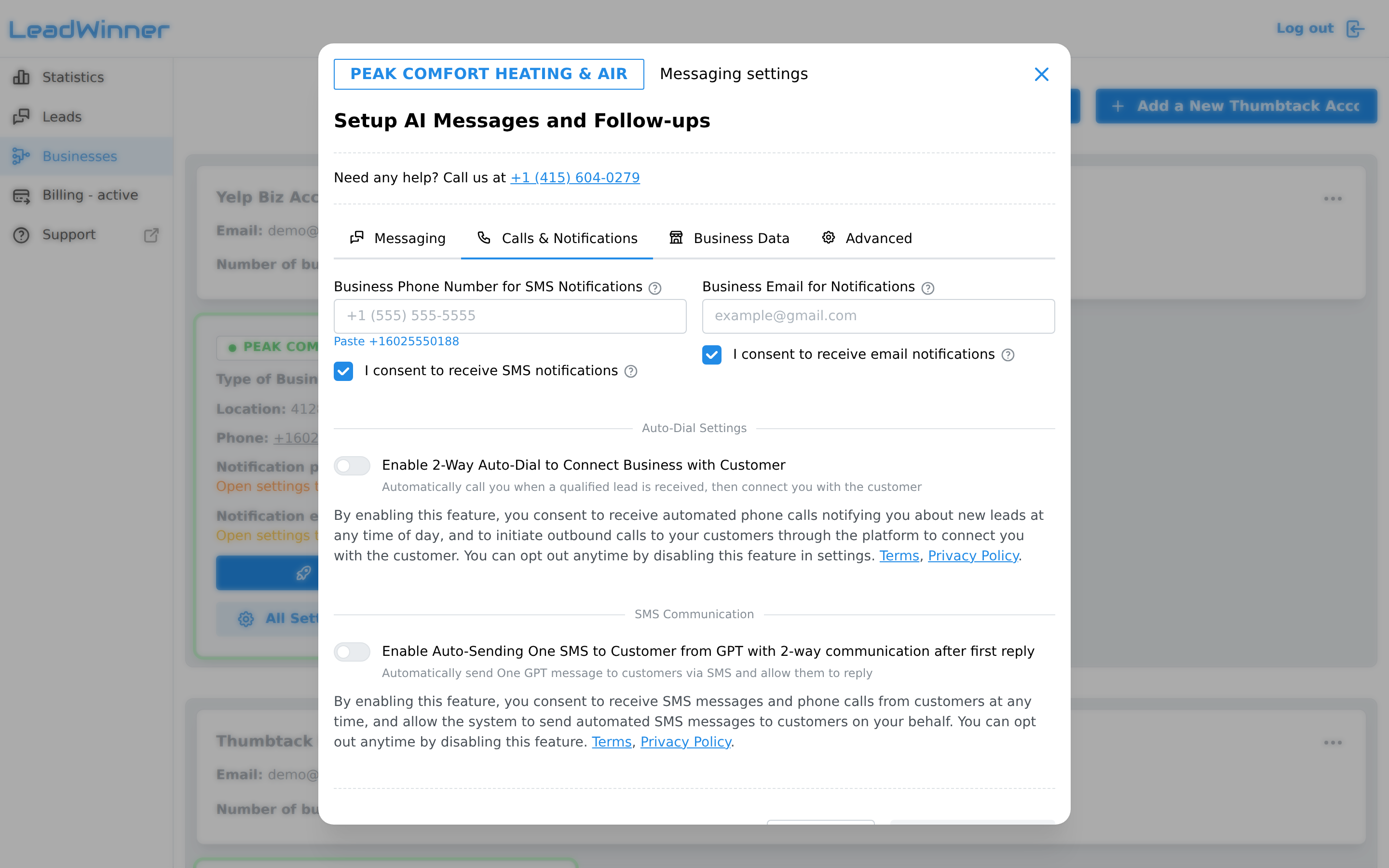
The same feature can be enabled from the Quick & Easy Setup wizard.
When calls happen (and when they don’t)
- A call is placed only for a fresh, qualified lead with a phone number. On Yelp, that means after the customer attaches their number to the request or shares it in the conversation.
- Maximum one call per lead; a call can last up to an hour.
- Calls respect your Non-Reply Hours — no auto-dial during your quiet hours.
- If a call connects and you speak with the customer, scheduled AI follow-ups for that lead are canceled.
- Customers who opted out of texts (replied STOP) are not auto-called either.
Consent and opting out
By enabling this feature, you consent to receive automated calls about new leads at any time of day, and to outbound calls being placed to your customers through the platform to connect you.
If you ever opt out during an automated call (press “9”), auto-dial to your number pauses; your settings will show “Automated calls to (555) 010-XXXX are paused after a previous opt-out” with a “Re-enable calls” button when you’re ready to resume.
Every call — connected, missed, or skipped — is recorded as an event in the lead’s timeline, so you always know what happened.
If a call you expected never came
- The lead had no phone number. On Yelp, the customer’s number arrives only after they attach it to the request or share it in the conversation — no number, no call.
- It was during your Non-Reply Hours. Auto-dial respects your quiet hours.
- The lead already got its call. Maximum one call per lead.
- You opted out earlier. If you pressed “9” during a call, your settings show automated calls as paused — click “Re-enable calls” to resume.
- The customer opted out of texts. Customers who replied STOP are not auto-called.
Questions about auto-calls? Contact support — the lead’s timeline tells us exactly what happened to each call.