
NewLeadWinner for iPhone
We reinvented the messenger for your leads.
Yelp, Thumbtack, and Google LSA leads in one inbox, with AI suggestions and voice typing.
- AI reply suggestions, like in the best email apps.
- Voice typing in any language, sent in English.
- Any chat in your language: 12 to pick from.


Scan with your iPhone® camera to download.
On Android? There's no app yet. Use LeadWinner in your phone's browser: app.leadwinner.ai.
Free on the App Store® · No in-app purchases · For iPhone®
-
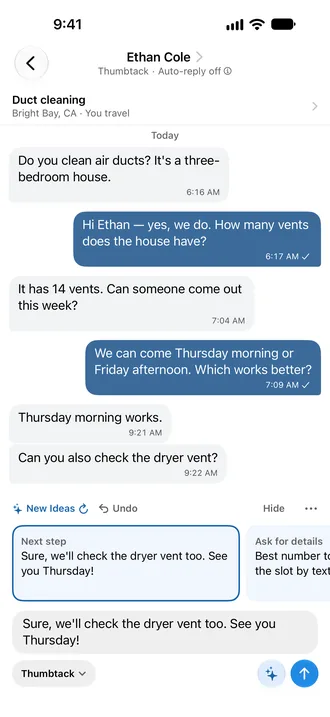
SuggestionsTap an AI reply, edit, send
-
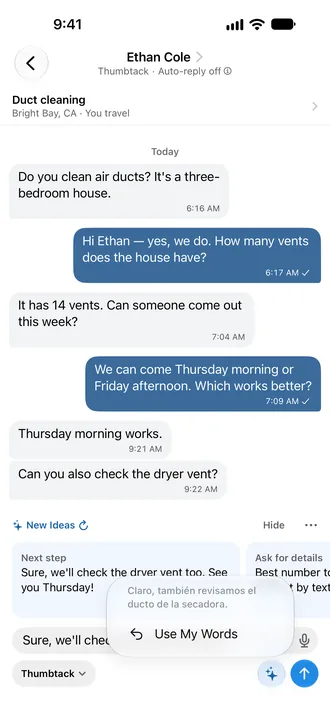
VoiceAny language, sent in English
-
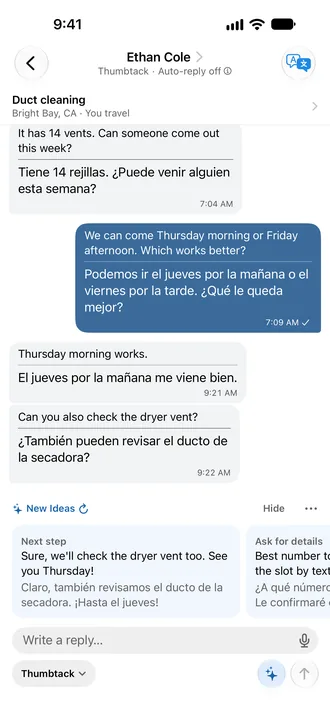
TranslationThe whole chat, 12 languages
Not an auto-responder: nothing goes out until you tap Send.
AI reply suggestions
Open a chat. Pick a reply.
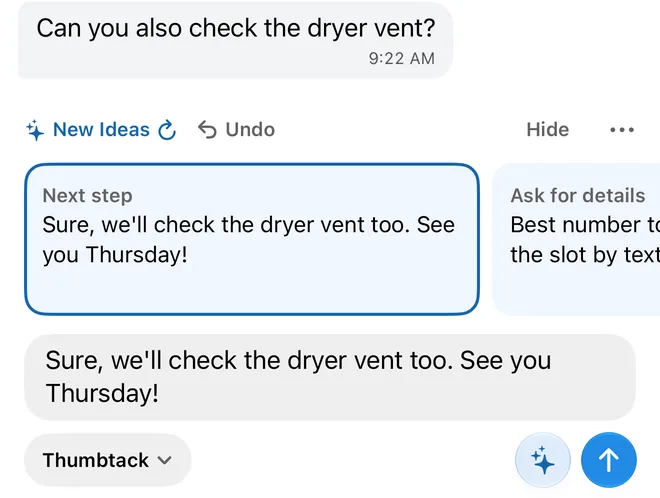
Like the smartest email apps, LeadWinner drafts replies for you. Open a conversation, and ready-made drafts appear, written from your business details and your recent replies. Tap one, change a word, and send.
- Pick a tone: Friendly, Professional, or Casual.
- Type a hint, like “Thursday works,” and get new drafts.
- Add your own rules, like “Mention free estimates.”
-
A lead writes

-
AI suggests replies
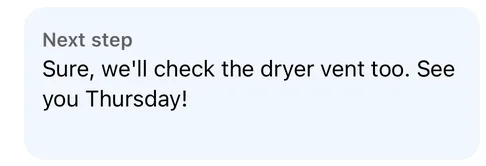
-
You tap it, check it, and send
Voice typing in any language
Say it in your language.
Send it in English.
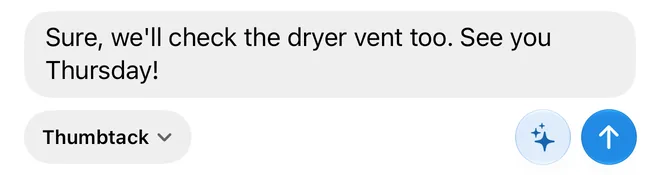
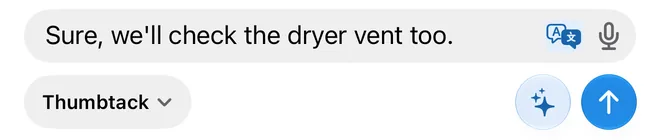
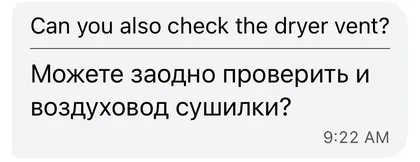
Tap the mic and talk the way you talk, in Spanish, Russian, Vietnamese, or any other language. English text lands in the reply box, ready to check.
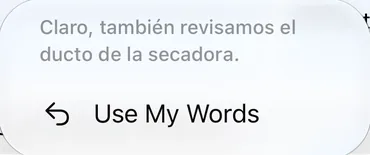
- Your own words stay one tap away, next to the English.
- If a price, day, or time comes out different in the English, the app can flag it.
- Fix anything before you tap Send.
-
Tap the mic and speak

-
English lands in the reply box
-
Your Spanish words, one tap away
Any chat in your language
Read every message in your language.
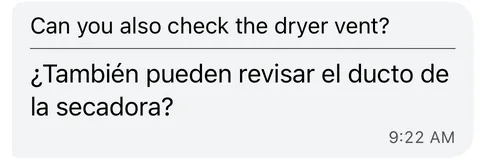
Turn on translation, pick your language, and one tap translates the whole conversation, right under the English. Your customers keep writing in English, and you answer in English.
- The English original always stays in place.
- Your own replies show in your language too.
- Translate one message, or the whole chat at once.
12 languages to read in:
- Español
- 简体中文
- 繁體中文
- Tagalog
- Tiếng Việt
- العربية
- Français
- 한국어
- Português
- हिन्दी
- Русский
- Українська
-
A customer writes in English
-
You read it in Spanish
-
Or in Russian, or in 10 other languages
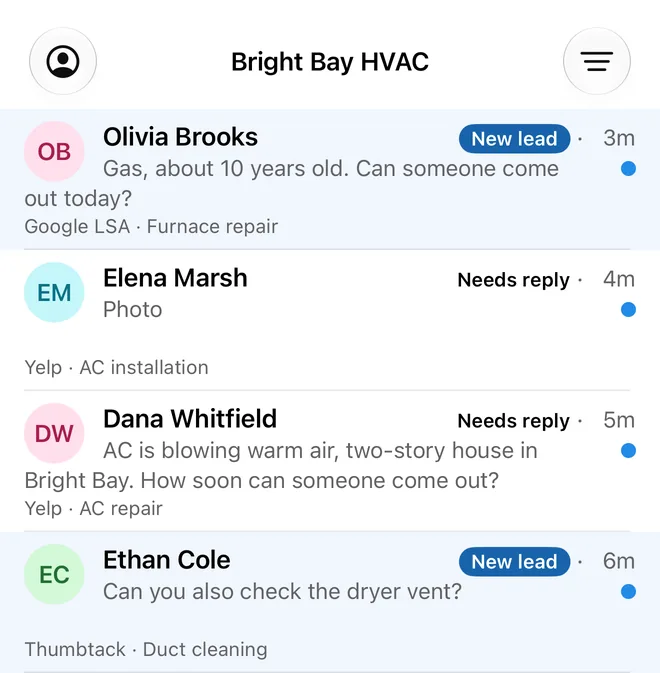
Yelp, Thumbtack, and Google LSA. One inbox.
New leads and messages from all three land in one fast list, along with texts to your LeadWinner texting number, if you have one.
- A notification when a lead writes, even when the app is closed.
- Several businesses in one inbox, with a filter for each.
- Search any lead or message.
 Yelp
 Thumbtack
 Google LSA
A messenger, not an auto-responder
You hit Send.
Suggestions and dictated words wait in the reply box for you to check. Nothing goes out until you tap Send.
- AI features stay off until you turn them on.
- Before you do, the app shows what is shared with a third-party AI service.
- Turn them off any time.
Price
Completely free.
No in-app purchases. No payment needed to use the app.
LeadWinner for iPhone
For iPhone with iOS 26 or later.
Why is it free?
-
It doesn't reply for you.
LeadWinner charges for the auto-responder, which answers leads on its own. This app only makes replying fast and easy: you read every message and tap Send yourself.
-
It shows what our AI can do.
We made it free so you can see, on your own leads, how well LeadWinner's AI drafts replies, turns your voice into English, and translates.
-
Want replies to go out on their own?
Turn on the auto-responder at leadwinner.ai when you're ready. It's optional, and it stays off unless you turn it on. See auto-responder pricing
Your first reply in three steps.
- 1
Download the app.
Free on the App Store, for iPhone with iOS 26 or later.
- 2
Sign in with your email.
Enter the 6-digit code we send. No password. New to LeadWinner? Sign up right in the app.
- 3
Connect your leads.
Add Yelp, Thumbtack, or Google LSA on the platform's own sign-in page. Already a LeadWinner customer? Your leads are there. Yelp shares leads only with businesses that advertise on Yelp.
Questions owners ask.
Is it really free? What's the catch?
LeadWinner for iPhone is free on the App Store, with no in-app purchases, and no payment is needed to use it. There's nothing to buy inside the app. LeadWinner's paid services, like the auto-responder, are separate, on the web, and stay off unless you turn them on. Yelp, Thumbtack, and Google still charge for their leads and ads as usual.
Why is it free?
Because the app doesn't reply for you. It makes replying fast. We want you to see what our AI can do with your real leads. If you later want replies to go out on their own, that's LeadWinner's auto-responder, a separate paid product you can turn on at leadwinner.ai. It's optional.
Does it reply to customers on its own?
No. It's a messenger, not an auto-responder. AI suggestions and dictated text only fill the reply box, and nothing goes out until you tap Send.
Do I need a paid LeadWinner plan?
No. You need a LeadWinner account, and you can create one in the app with your email and a 6-digit code. The app works with or without a plan.
Which languages does it support?
You can read customer messages in 12 languages: Spanish, Simplified Chinese, Traditional Chinese, Tagalog, Vietnamese, Arabic, French, Korean, Portuguese, Hindi, Russian, and Ukrainian. Speak your reply in any language, and it lands in the reply box in English, ready to check.
What if a translation is wrong?
It can happen: translation and speech-to-text can get things wrong, especially names, prices, and dates. That's why the English original stays in place, you always see the English before you send, and the app can flag a price, day, or time that looks different in the English. You decide what goes out.
Will my customers know I used AI or translation?
Your customer gets the English text you approved, sent from your business account on Yelp, Thumbtack, or Google LSA, or from your business texting number. The app doesn't add a note saying AI or translation was used, unless a platform's rules or the law require one. Labels you see in the app are only for you.
Will the suggestions sound like me?
You set the tone (Friendly, Professional, or Casual) and a sign-off, and you can add rules like “Free estimates.” Suggestions also use your recent replies and your business details. Tap one, edit it, and send, or type a quick hint and get new ones.
Does it work with my existing Yelp, Thumbtack, or Google account?
Yes. In the app, go to Account › Add a Platform and sign in on Yelp's, Thumbtack's, or Google's own page. Every business on that account is added, with the auto-responder off. Already a LeadWinner customer? Just sign in, and your leads are there. One note: Yelp shares leads only with businesses that advertise on Yelp.
Does it replace the Yelp and Thumbtack apps?
For conversations, it can: leads from Yelp, Thumbtack, and Google LSA land in one inbox, and you reply from there. Keep the platform apps for what only they do, like claiming Thumbtack job offers and managing your ad budget, profile, and reviews.
Is the AI on by default?
No. AI suggestions, voice typing, and translation stay off until you turn them on. Before you do, the app tells you what is shared with a third-party AI service. You can turn them off any time.
Is my data safe?
You stay in control. AI features stay off until you turn them on, and the app shows first what is shared with a third-party AI service. We use your voice only to turn it into text. Data from your Yelp, Thumbtack, and Google LSA accounts, and what you dictate, isn't used to train general AI models. You connect each platform on its own sign-in page, so LeadWinner never sees your password. You can delete your account in the app.
Will I know when a lead writes?
Yes, if you allow notifications. You get one when a customer writes, even when the app is closed. You can turn notifications off for any business.
What about texts (SMS)?
If your business has a LeadWinner texting number, texts to it show up in the same inbox, and you can text a lead who shared a phone number. Customers see your business texting number, not your cell. Texting numbers are set up in your LeadWinner account on the web. The app doesn't sell them.
Can my team use it? What about several businesses?
Several businesses, yes: they all show in one inbox, you can filter by business, and notifications can be on or off for each one. The app signs in to one LeadWinner account, which you can use on more than one iPhone. There are no separate logins or roles for team members.
Is there an Android app?
Not yet. On Android, use LeadWinner in your phone's browser at app.leadwinner.ai.
LeadWinner for iPhone
Get it before the next lead writes.
Free on the App Store. No in-app purchases.
Scan with your iPhone camera to download.
For iPhone with iOS 26 or later. On Android, use app.leadwinner.ai in your browser.
Free on the App Store LeadWinner for iPhone